MartianCraft.

Designing complex oil and gas apps for iOS and the web since 2022.

RoleSenior UX/UI Designer
Tenure2022 – Now
IndustryDesign consultancy
ClientOil & gas industry
PlatformsiOS · Web
Overview

Complex apps, made usable.

MartianCraft is an iOS development and consulting studio. I worked closely with their teams on large, complex apps for clients in the oil and gas industry.

The work spanned iOS and web. Much of it meant carefully translating dense, data-heavy workflows between platforms so they stayed accurate and still felt simple, backed by a lot of user research with the people who rely on these tools every day.

The same app had to work for someone in the field and someone in the office.

The map

A map of the whole operation.

Field and office teams both think in places. So the map became the home screen, on iOS and on the web.

mesa.app/map
Example web map of sites, facilities and wells
Who it’s for

Two kinds of users.

How I worked

Research-led.

  1. Listen.User research with field and office teams.
  2. Map.Document real workflows end to end.
  3. Translate.Carry complex flows across iOS and web.
  4. Prototype.Test with the people doing the job.
  5. Refine.Iterate until it works in both settings.
On iOS · for the field

Built for the field.

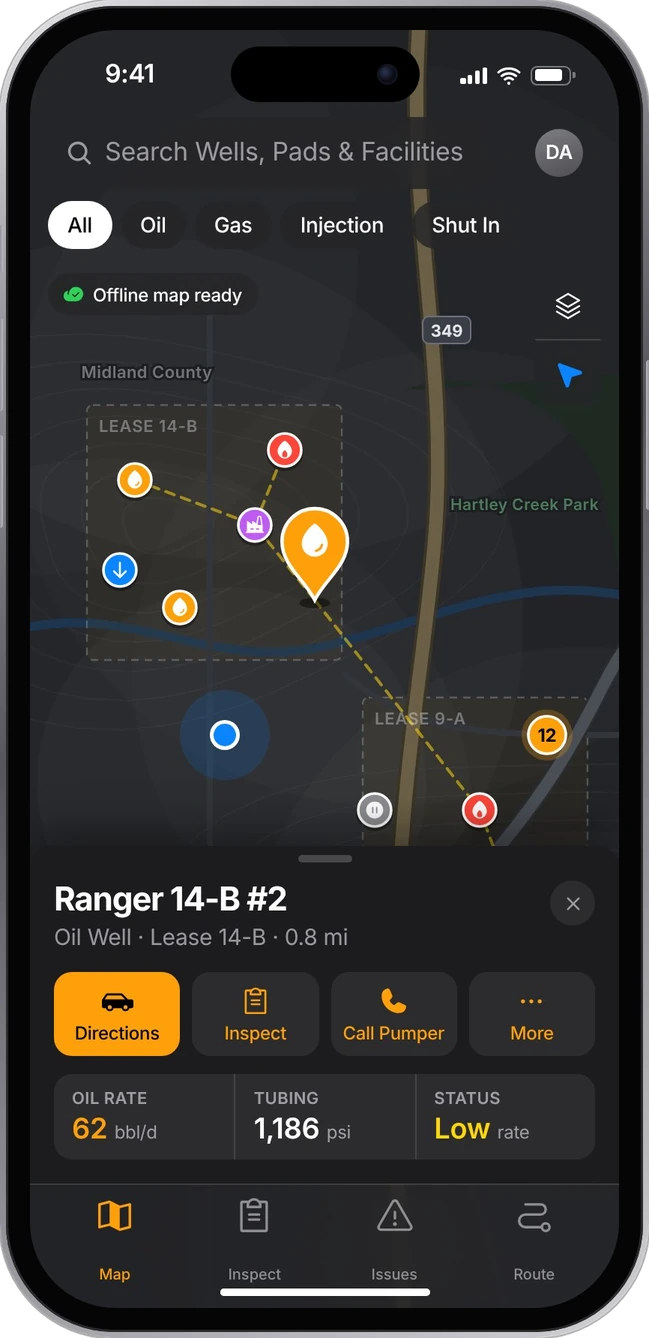
Example iOS map of wells and facilities with a well summary sheet
Every well on one map.

Wells, pads, pipelines and lease lines, with offline maps for sites out of signal. Tap a well to see its numbers.

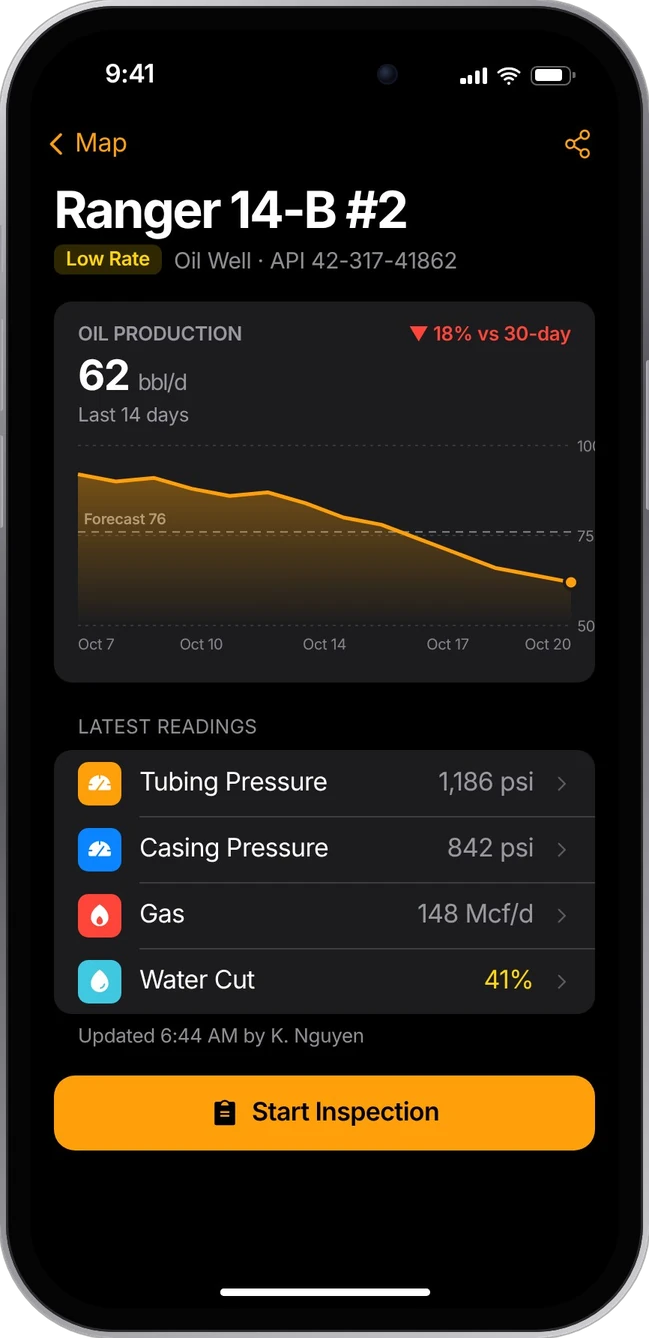
Example well detail with production trend and pressures
Well health at a glance.

Two weeks of production against forecast, plus pressures and water cut, so a problem is obvious before the crew arrives.

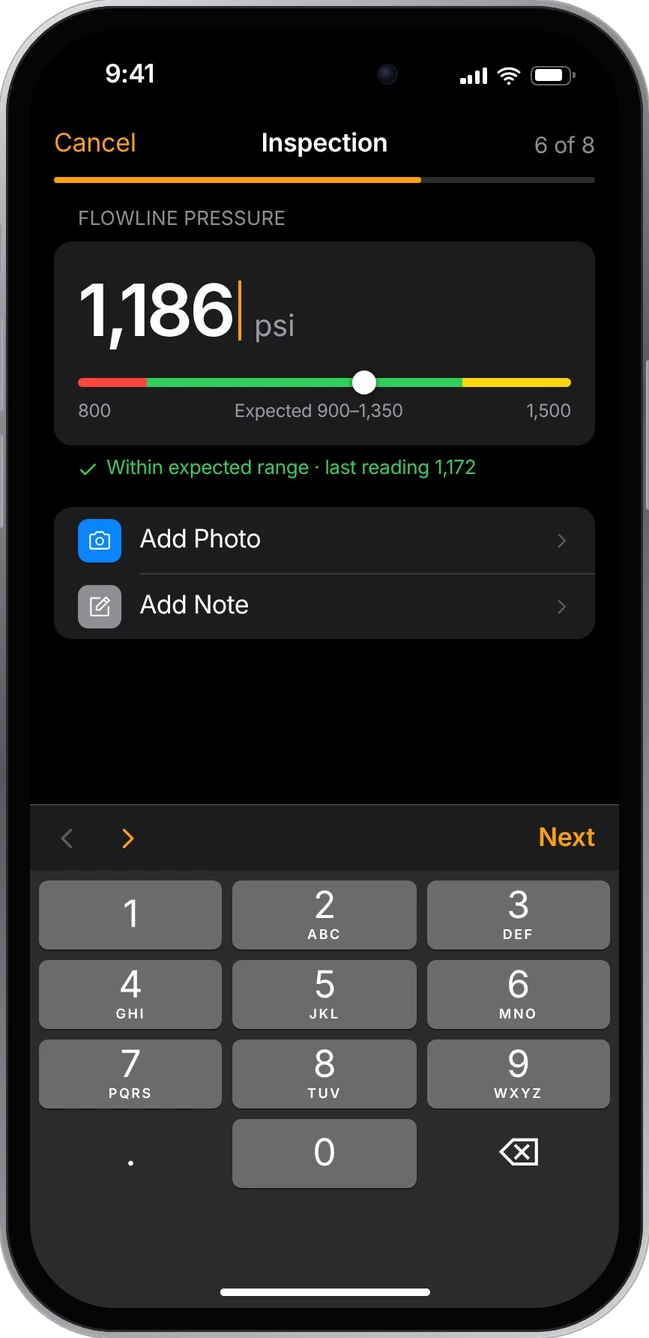
Example inspection step logging flowline pressure against its expected range
Readings with context.

One reading per step, shown against its expected range and recent history. Saved offline, synced later.

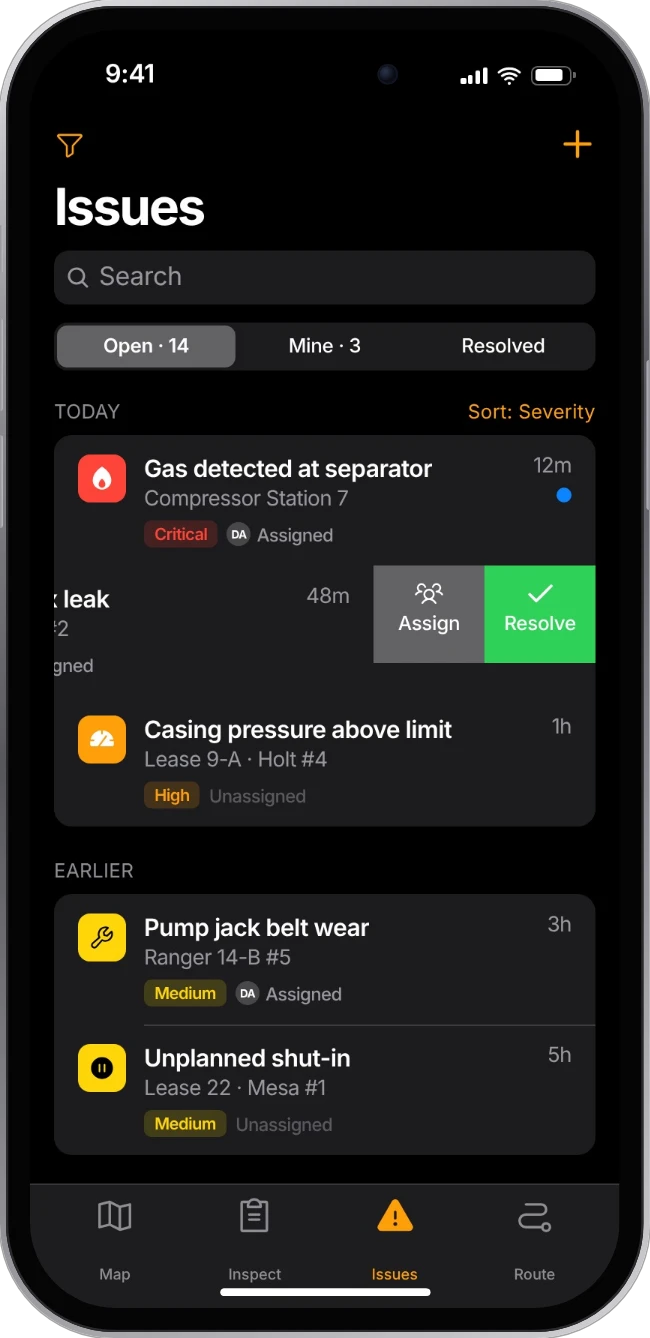
Example issues list sorted by severity, with one row swiped to assign or resolve
Issues, triaged.

Leaks, alarms and failed equipment ranked by severity. Swipe to assign a crew or resolve on the spot.

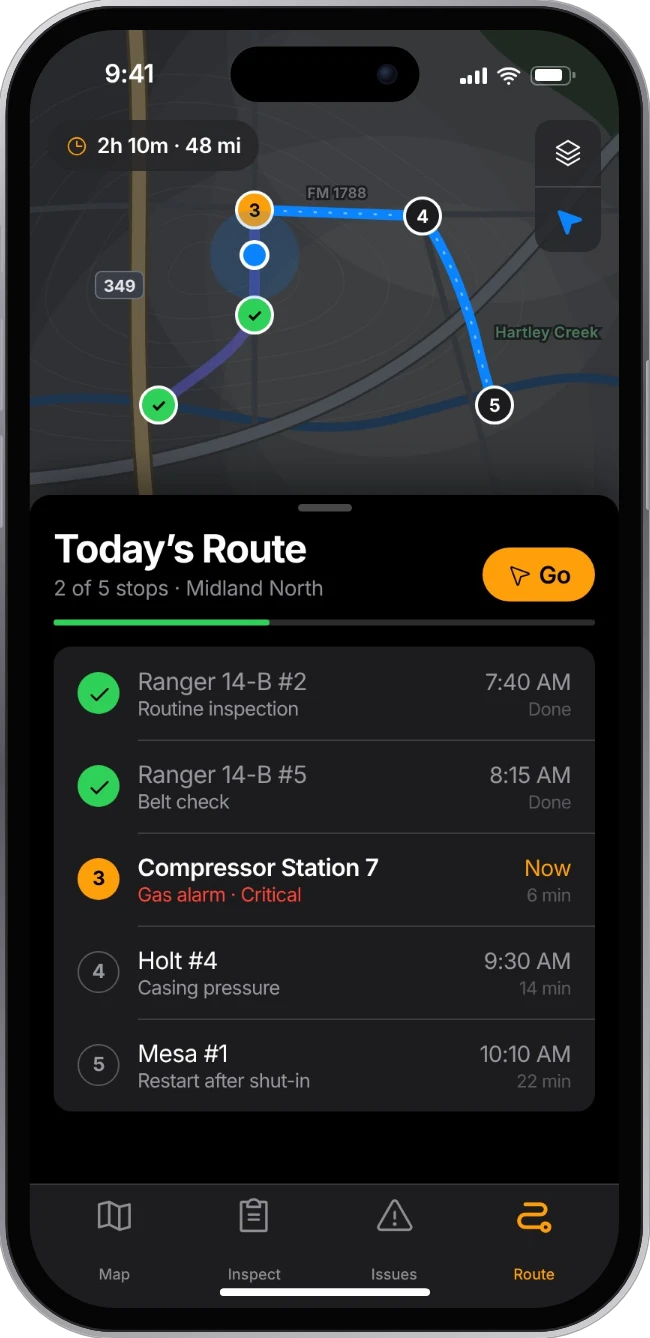
Example daily route with ordered stops on a map and a checklist of wells
A route, not a list.

The day’s wells in drive order, with urgent issues pulled to the front and finished stops checked off.

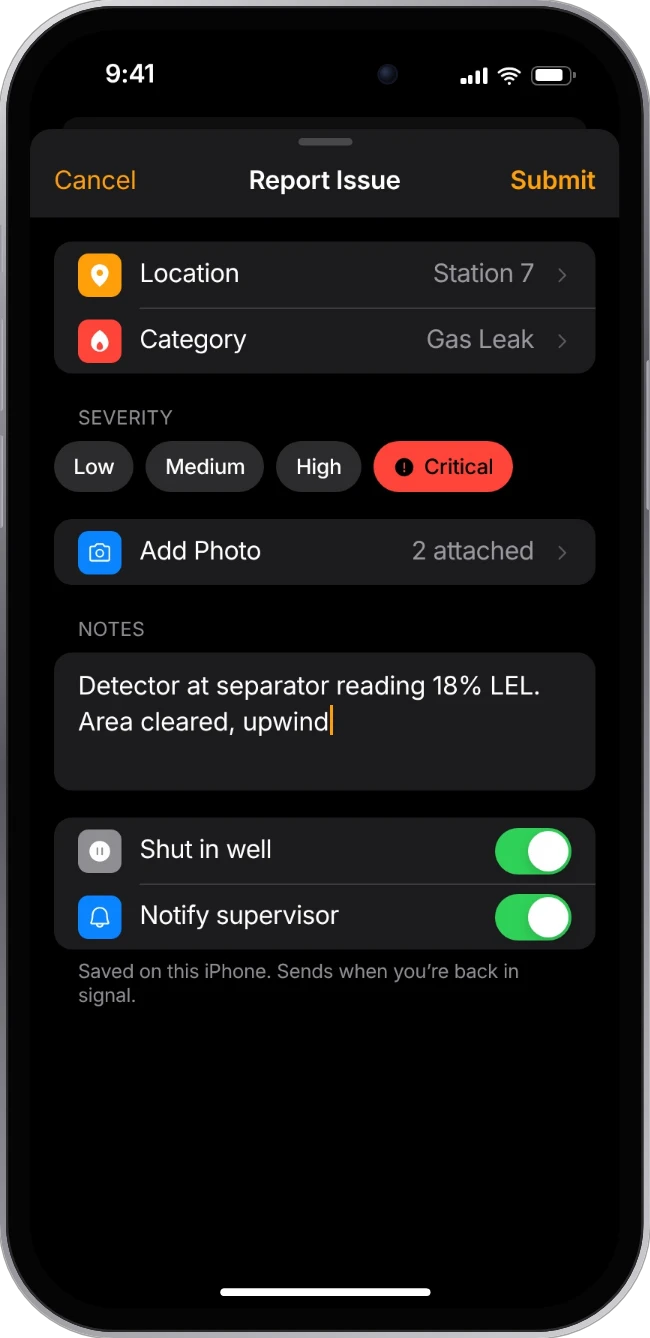
Example report-an-issue sheet with category, severity, photo and notes
Report it from the pad.

Category, severity, photos and notes in one sheet. Shut in the well and alert a supervisor without leaving it.

On the web · for the office

Built for the office.

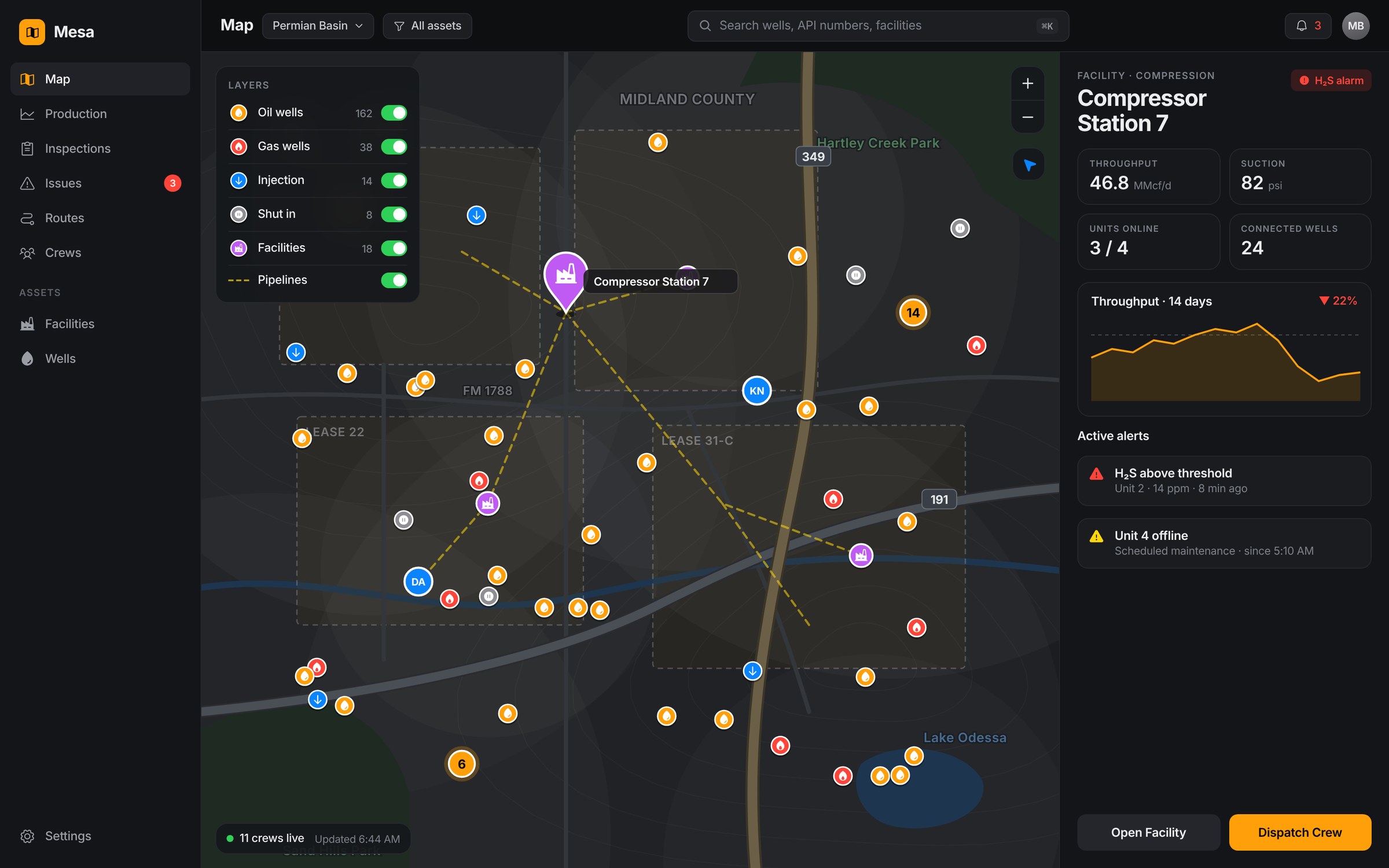
Map console

Sites, facilities and wells.

Every asset in the basin on a topographic map, with layers for well types, pipelines and lease lines. Pick a facility to see throughput, alerts and dispatch a crew.

mesa.app/map
Example web map console of wells, facilities and pipelines with a facility detail panel
Production

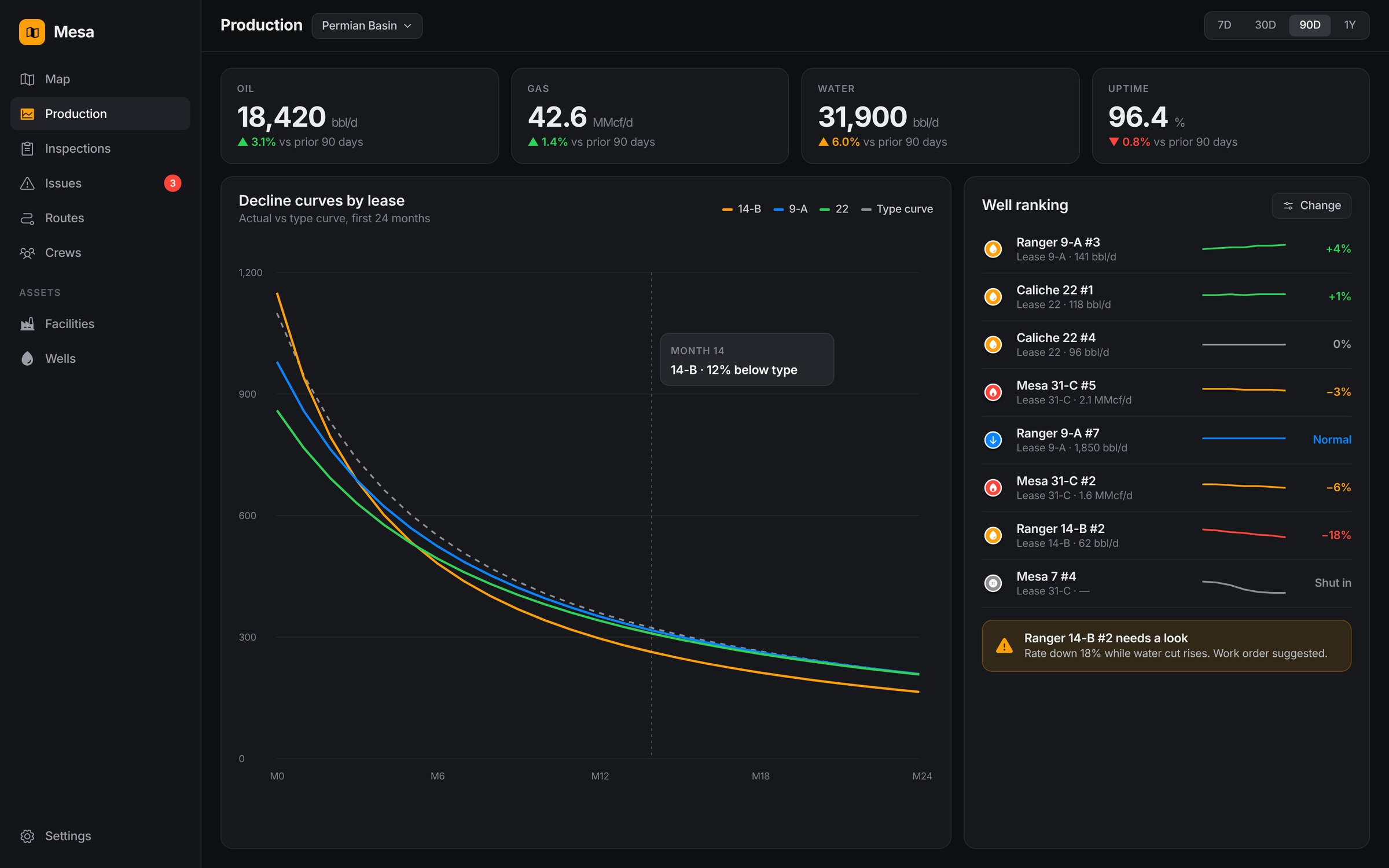
From numbers to the next action.

Decline curves against the type curve and a ranked list of wells, so engineers see which well needs attention and why.
mesa.app/production
Example production analytics with decline curves and well ranking

Client work at MartianCraft is confidential. These screens are representative examples I recreated for this portfolio to show the kind of design work involved. They aren’t actual client designs or data.

Next projectThe Events App →
Field worker persona

Ray Delgado.

Lease operator

“If it takes more than a few taps, I’ll write it on my glove and type it in tonight.”
Age41
BasePermian Basin, TX
Experience14 years in the field
Territory35 wells · 150 mi a day

About

Ray starts before sunrise and spends most of the day in his truck, driving between remote well sites. He checks pressures, looks for leaks, logs readings and flags anything that needs a crew. He’s good at his job and has no patience for software that slows him down.

◎Goals

  • Finish his route before dark
  • Catch small problems before they become shutdowns
  • Log each reading once, correctly

✓Needs

  • Works with no signal and syncs later
  • Big targets he can hit with gloves on
  • Expected ranges right next to each reading
  • Today’s stops in order, on a map

Profile

Tech comfort
Connectivity
Time on a screen
Data he needs

Devices

  • iPhone in a rugged case
  • Truck-mounted tablet
  • Paper notebook, as backup

!Frustrations

  • Losing a morning of readings to a dead zone
  • Re-typing paper notes at the end of the day
  • Tiny controls and glare on a bright screen
  • Office calling to ask for info he already logged

A typical day

  1. Truck check, sync today’s route
  2. First site: readings and walkaround
  3. Flags a low-rate well, adds photos
  4. Lunch in the truck, catches signal
  5. Last stop, end-of-day sync
What this meant for the design
Offline by default

Everything saves on the phone with a clear sync status, so nothing is lost.

One reading per step

Big numbers, the expected range and recent history on every step.

Field mode

Dark, high-contrast screens and 54pt+ targets built for glare and gloves.

Map-first route

The day’s stops on a map, with the next action one tap away.

A composite persona built from research patterns. Names and details are illustrative, and no client data is shown.

Office worker persona

Megan Cho.

Production engineer

“I don’t need more data. I need to know which five wells to look at today.”
Age33
BaseMidland, TX office
Experience6 years
Oversees200+ wells, 4 leases

About

Megan owns production for a group of leases. Her day is a loop of reviewing numbers, deciding what needs attention and sending crews to fix it. She’s fluent with data but stretched thin, and the information she needs is spread across spreadsheets, emails and calls.

◎Goals

  • Keep production on forecast
  • Spot underperforming wells early
  • Send the right crew to the right site
  • Report clearly to management

✓Needs

  • Every asset on one map
  • Trends against forecast and type curves
  • Alerts ranked by impact, with the reason
  • Field notes and photos tied to the well

Profile

Tech comfort
Connectivity
Time on a screen
Data she needs

Devices

  • Dual-monitor desktop
  • Laptop for meetings
  • iPhone for urgent alerts

!Frustrations

  • Data scattered across tools and inboxes
  • Field updates that arrive a day late
  • Not knowing if a crew already handled it
  • Dashboards that show everything at once

A typical day

  1. Reviews the overnight production report
  2. Triages alerts, picks wells to check
  3. Production meeting with the team
  4. Decline-curve analysis, plans work
  5. Creates work orders, dispatches crews
What this meant for the design
A shared map

The same map as the field app, so office and field talk about the same places.

Ranked, with a why

Wells sorted by change, each with the reason it needs a look.

One record

A reading in the field lands on the same well page minutes later.

Progressive detail

A calm overview first, with depth one click away.

A composite persona built from research patterns. Names and details are illustrative, and no client data is shown.

Contact

Ready to talk?

Emailjakerems@ymail.com
Phone510-209-8554
ElsewhereLinkedIn